Pick the wrong practice management software and every part of your firm feels it. Billing gets messy, documents scatter across three different logins, and staff quietly build workarounds instead of using the system you paid for.

The right law practice management software depends on your firm’s size and workflow, but there’s a second decision that matters just as much as which vendor you pick: whether that software runs on your own server or in the cloud.

This guide breaks down 15 legal practice management software platforms, from PCLaw to Clio, and where each one actually fits. It also covers a question most buying guides skip: how server-based and cloud-based deployment change what you get, and why that choice deserves its own line on your checklist.

  • Law practice management software (also called legal practice management software) centralizes case management, billing, and documents into one platform instead of scattered tools.

  • Deployment method, cloud-based or server-based, changes who manages your security and updates, and matters as much as which vendor you pick.

  • Cloud-based platforms trade some customization for fast setup and low maintenance; server-based platforms trade convenience for deeper, more mature features.

  • A private cloud lets your firm run server-based software with cloud-level accessibility, so you don’t have to choose one or the other.

What Is Law Practice Management Software?

Law practice management software is a system that centralizes case management, billing, and documents so your firm runs on one connected platform instead of scattered tools.

We work with hundreds of law firms across North America, and the question we hear most often is some version of “what’s the best law practice management software?” That’s a bit like asking what the best kind of car is. The answer depends on what your firm actually needs.

Some practice management platforms lean heavily on accounting. If your firm already has accounting software it’s committed to, that focus doesn’t help you. Other platforms lean into document and form creation, which matters for some firms and not others.

Start by identifying which features and functions matter most to your firm. That list becomes the framework you hold every option against, and it’s a faster path to a shortlist than reading every review on the internet.

Whatever practice management tool sits at the center of your firm is really the epicenter of its heartbeat, if it’s not working, the firm’s not working.

— Dennis Dimka, Founder, LexWorkplace

What Does Legal Practice Management Software Actually Do?

A law practice management platform needs to handle four jobs well, no matter which one you choose: case and client management, financial and trust accounting, documents and communication, and access and integrations.

The scope and depth of any given platform varies quite a bit from product to product. Here’s what to expect across the four core categories.
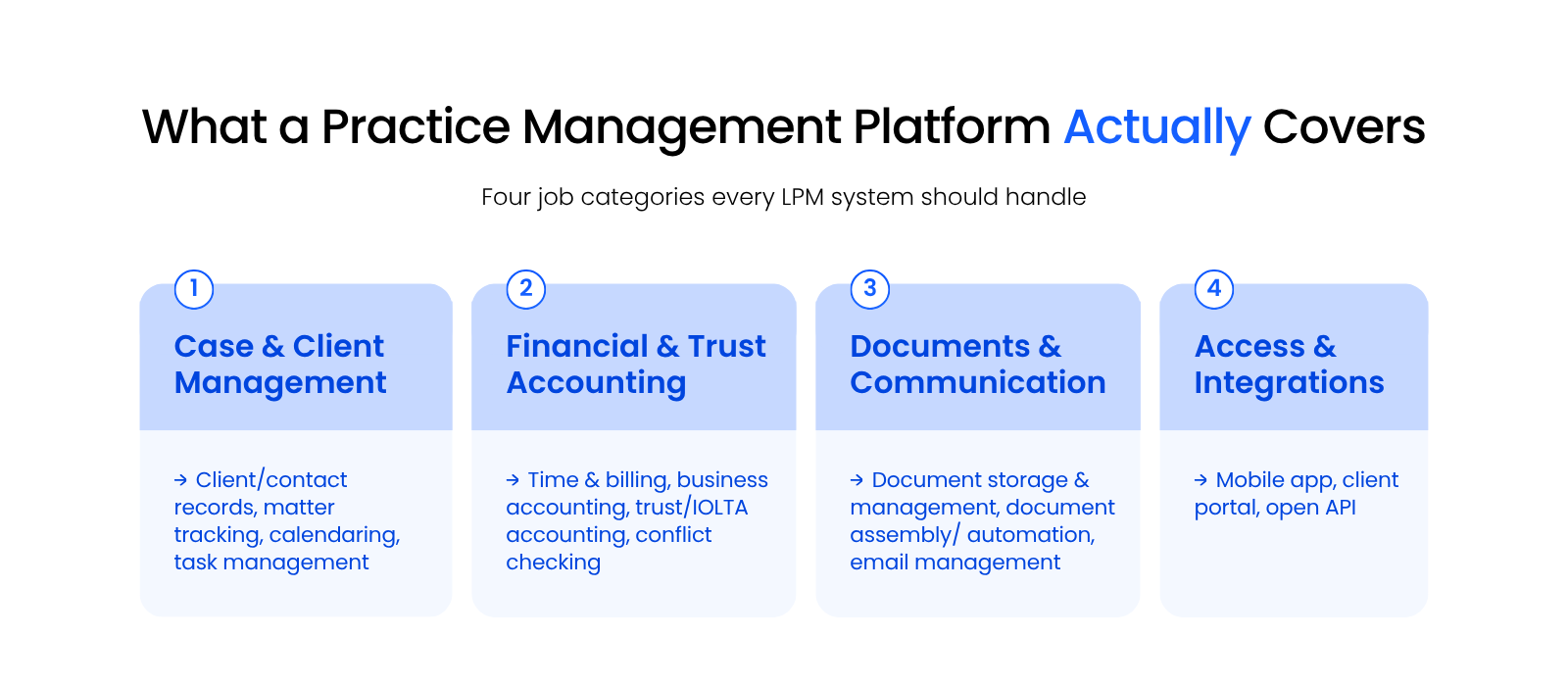
Four-quadrant graphic grouping law practice management software features into case management, financial, documents, and access categories.

Case and Client Management

Case and client management keeps every matter’s contacts, deadlines, and tasks in one searchable record instead of scattered notes.

  • Client and contact database
  • Matter tracking and calendaring
  • Task management
  • Conflict checking — a documented record every time you check for a conflict of interest

Financial and Trust Accounting

Billing, business accounting, and trust or IOLTA accounting live together so your firm invoices accurately and stays compliant with trust-fund rules.

  • Billing and business accounting
  • Trust or IOLTA accounting — not optional for a law firm the way it is for most small businesses
  • Tracks client funds separately and produces the reporting your bar requires

Documents and Communication

Document storage, assembly, and email management keep case files and client correspondence attached to the right matter automatically.

  • Document storage and management
  • Document assembly — automates preparation of court documents and forms
  • Email management — saves messages to the right matter through Outlook integration instead of leaving them buried in an inbox

Access and Integrations

Mobile access, a client portal, and an open API let your team and your clients reach the system from anywhere without extra software.

  • Mobile access
  • Client portal — lets clients see updates and share documents without a phone call, cutting down on status-check emails
  • Open API

The Best Law Practice Management Software at a Glance

The fastest way to narrow 15 practice management platforms down to a shortlist is to compare them side by side on deployment, price, and firm size.

In our experience working with hundreds of law firms, here’s how the top law practice management platforms stack up. We’ve grouped them by deployment method first, because that choice shapes everything else about how the software runs.

The Best Law Practice Management Software at a Glance

Software Deployment Starting Price Best For
PCLaw Server-based or private cloud Contact vendor Firms wanting billing and accounting unified in one system
Tabs3 and PracticeMaster Server-based or private cloud Contact vendor Firms needing strong back-office billing plus matter management
ProLaw Server-based or private cloud Contact vendor Firms wanting case management, document management, and accounting together
Time Matters Server-based or private cloud Contact vendor Firms that want deep customization of workflows and reports
Clio Cloud-based $49/user/month Solo and small firms wanting quick setup and broad integrations
Actionstep Cloud-based Contact vendor Midsize firms wanting an end-to-end platform with full legal accounting
Smokeball Cloud-based Contact vendor Firms wanting automatic time capture and heavy document automation
LEAP Hybrid (cloud with desktop app) Contact vendor Form-heavy practices needing jurisdiction-specific document assembly
CosmoLex Cloud-based $109/user/month Firms wanting built-in business and trust accounting without QuickBooks
Rocket Matter Cloud-based $49/user/month Firms that want visual, project-style matter tracking
MyCase Cloud-based $39/user/month Firms prioritizing a strong client portal and fast onboarding
Practice Panther Cloud-based $49/user/month Solo and small firms wanting a lightweight built-in CRM
Bill4Time Cloud-based $27/user/month Firms with complex billing needs like LEDES or split arrangements
Centerbase Cloud-based Contact vendor Firms wanting a highly customizable all-in-one platform
LeanLaw Cloud-based $55/user/month Firms that want deep QuickBooks integration for billing

A private cloud hosts your law practice management software, documents, and data in the cloud so you get the reliability, security, and mobility of cloud computing without giving up the server-based software your firm already knows.

Server-Based and Private Cloud Law Practice Management Software

PCLaw, Tabs3, ProLaw, and Time Matters give firms deep, mature functionality that runs on your own server or a private cloud instead of a vendor’s servers.

These four platforms have been around for decades, and that maturity shows up as depth: more configuration options, tighter accounting integration, and features that newer cloud-native tools haven’t built yet.


pclaw_time_matters_logo

SERVER-BASED / PRIVATE CLOUD

PCLaw

A long-standing practice management, billing, and accounting platform for small and midsize firms.

Best for: Firms wanting billing and accounting unified in one system

PRICING

Contact vendor

FREE TRIAL

No

DEPLOYMENT

Server/Private cloud

AI FEATURES

No

STRENGTHS

  • Fast to set up without hiring a consultant
  • Fully integrated business and trust accounting
  • Straightforward, uncomplicated case management
  • Tight integration with Time Matters

LIMITATIONS

  • Requires your firm or IT provider to manage updates and backups unless hosted in a private cloud
  • Interface reflects an older design compared to newer cloud platforms

PCLaw pairs lightweight case and client management with strong built-in billing and business accounting, and it’s one of the few platforms on this list that doesn’t require separate bookkeeping software.

tabs3 logo

SERVER-BASED / PRIVATE CLOUD

Tabs3 and PracticeMaster

A modular suite pairing back-office billing (Tabs3) with front-office client and matter management (PracticeMaster).

Best for: Firms needing strong back-office billing plus matter management

PRICING

Contact vendor

FREE TRIAL

No

DEPLOYMENT

Server/Private cloud

AI FEATURES

No

STRENGTHS

  • Modular front-office and back-office design
  • Strong customer support reputation
  • Large network of authorized consultants

LIMITATIONS

  • Two separate products to license and learn

  • Requires your firm or IT provider to manage updates and backups unless hosted in a private cloud

Tabs3 and its counterpart, PracticeMaster, work together as one suite: Tabs3 handles the “back office” (time, billing, and accounting), and PracticeMaster covers the “front office” (client and matter management).

prolaw logo

SERVER-BASED / PRIVATE CLOUD

ProLaw

The only platform on this list built to run case management, document management, and accounting together in one system.

Best for: Midsize to larger firms, corporate legal departments, and government offices wanting case management, document management, and accounting together

PRICING

Contact vendor

FREE TRIAL

No

DEPLOYMENT

Server/Private cloud

AI FEATURES

No

STRENGTHS

  • End-to-end solution across practice management, document management, and accounting
  • Deep integration with Microsoft Office
  • Modern, simplified interface
  • Multi-language and multi-currency support — useful for firms with international offices or clients, and not something most other vendors on this list offer

LIMITATIONS

  • Requires your firm or IT provider to manage updates and backups unless hosted in a private cloud
  • Broader scope means a longer learning curve than single-purpose tools
  • Some reviewers report a decline in support quality following past ownership changes

ProLaw, made by Elite, is the only platform on this list built to run case management, document management, and accounting together in one system, which cuts down on the number of vendors your firm has to manage.

pclaw_time_matters_logo

SERVER-BASED / PRIVATE CLOUD

Time Matters

Deep customization and strong document management, often paired with PCLaw for accounting.

Best for: Firms that want deep customization of workflows and reports

PRICING

Contact vendor

FREE TRIAL

No

DEPLOYMENT

Server/Private cloud

AI FEATURES

No

STRENGTHS

  • Deep customization across reports, workflows, and dashboards
  • Large network of certified consultants
  • Tight integration with PCLaw for accounting

LIMITATIONS

  • Requires your firm or IT provider to manage updates and backups unless hosted in a private cloud
  • Full billing functionality typically requires pairing with PCLaw or Juris

Time Matters pairs deep customization with strong document management, and firms often pair it with PCLaw or Juris for accounting.

Move Your Legal Software to the Cloud

With Uptime Cloud:

  • Cloudify Your Legal Software
  • Expert Legal Software Hosting/Support
  • Cloud Storage for Documents + Data
  • End-to-End Security
  • Office 365 + IT Support (Optional)

Cloud-Based and Web-Based Law Practice Management Software

Clio, MyCase, CosmoLex, and eight other cloud-native platforms run entirely in the browser, trading some of the deep customization above for fast setup and low maintenance.


clio-logo

CLOUD-BASED

Clio Manage

Among the most widely adopted cloud-based practice management platforms, known for its clean interface and deep integrations.

Best for: Solo and small firms wanting quick setup and broad integrations

PRICING

$49/user/month

FREE TRIAL

Yes

DEPLOYMENT

Cloud-based

AI FEATURES

Yes

STRENGTHS

  • Clean, modern interface that’s fast to learn
  • Deep integrations through the Clio App Directory
  • Clio Duo, a native AI assistant for case summaries and document analysis
  • Pairs with Clio Grow for intake and CRM

LIMITATIONS

  • Complete tier (with Clio Grow) adds meaningfully to the per-user cost
  • Less configurable than server-based platforms for firms with highly specific workflows

Clio Manage is among the most widely adopted cloud-based practice management platforms, known for its clean interface and deep integrations with tools firms already use.

Actionstep logo

CLOUD-BASED

Actionstep

Built for midsize firms wanting intake, matter management, document management, billing, and full legal accounting on one configurable platform.

Best for: Midsize firms wanting an end-to-end platform with full legal accounting

PRICING

Contact Vendor

FREE TRIAL

No

DEPLOYMENT

Cloud-based

AI FEATURES

Yes

STRENGTHS

  • End-to-end platform from intake through legal accounting
  • Highly configurable workflows and data fields
  • Strong trust accounting and financial reporting
  • Trace adds AI-powered passive time capture across Outlook, Word, and the web (rolling out 2026 as a paid add-on)

LIMITATIONS

  • Pricing isn’t published, so budgeting requires a sales conversation
  • Configuration depth can mean a longer setup process than simpler cloud tools

Actionstep is built for midsize firms that want intake, matter management, document management, billing, and full legal accounting on one configurable platform.

Smokeball logo

CLOUD-BASED

Smokeball

Blends practice management with document automation and tight Microsoft and Outlook integration.

Best for: Firms wanting automatic time capture and heavy document automation

PRICING

Contact Vendor

FREE TRIAL

Yes

DEPLOYMENT

Cloud-based

AI FEATURES

Yes

STRENGTHS

  • AutoTime automatic time tracking captured directly in Word and Outlook
  • Large document assembly template library
  • Smokeball AI for drafting and summarization

LIMITATIONS

  • Windows-only — no native Mac support; Mac users need a virtual machine like Parallels (verified against Smokeball’s own FAQ/system requirements)
  • Pricing isn’t fully published across all tiers

Smokeball blends practice management with document automation and tight Microsoft and Outlook integration, and it markets itself well to firms of nearly any size.

CosmoLex logo

CLOUD-BASED

CosmoLex

Bundles practice management with full business and trust accounting, so most firms don’t need a separate QuickBooks subscription.

Best for: Firms wanting built-in business and trust accounting without QuickBooks

PRICING

$109/user/month

FREE TRIAL

Yes

DEPLOYMENT

Cloud-based

AI FEATURES

Yes

STRENGTHS

  • Integrated business and trust accounting with no separate bookkeeping system
  • Financial-first matter views for balances and revenue
  • Built-in trust and IOLTA compliance tooling
  • CosmoLex AI Intake automates lead capture, routing, and conflict-check prep for new client inquiries

LIMITATIONS

  • Higher starting price than several cloud competitors
  • The FirmsFirst Bundle price isn’t independently confirmed — verify directly with the vendor before publishing that figure

CosmoLex bundles practice management with full business and trust accounting, which means most firms don’t need a separate QuickBooks subscription.

CLOUD-BASED

Rocket Matter

Takes a project-management approach to matter tracking, including kanban-style boards.

Best for: Firms that want visual, project-style matter tracking

PRICING

$59/user/month

FREE TRIAL

Yes

DEPLOYMENT

Cloud-based

AI FEATURES

Yes

STRENGTHS

  • Project-style matter management with kanban views
  • Document assembly with auto-filed outputs and client sharing
  • Optional insurance defense module
  • ChatGPT integration adds AI assistance on top of its Business Intelligence reporting

LIMITATIONS

  • Sources conflict on whether listed pricing is annual or monthly — confirm before publishing
  • Kanban-style matter view suits some workflows better than others

Rocket Matter takes a project-management approach to matter tracking, including kanban-style boards for visualizing case progress.

CLOUD-BASED

MyCase

Built its reputation on ease of use and arguably has the strongest client portal of any platform on this list.

Best for: Firms prioritizing a strong client portal and fast onboarding

PRICING

$50/user/month

FREE TRIAL

Yes

DEPLOYMENT

Cloud-based

AI FEATURES

Yes

STRENGTHS

  • Fast to get up and running
  • Sophisticated client portal for messaging, documents, and payments
  • Built-in lead and intake management
  • MyCase IQ adds AI-powered document summaries and drafting assistance on Pro and Advanced tiers

LIMITATIONS

  • Advanced tier is needed to unlock full-text search and higher-end features
  • Less configurable than server-based platforms for complex accounting needs

MyCase built its reputation on ease of use and arguably has the strongest client portal of any platform on this list.

Practice Panther logo

CLOUD-BASED

Practice Panther

A popular choice for solo and small firms that want an intuitive interface plus a lightweight CRM for intake.

Best for: Solo and small firms wanting a lightweight built-in CRM

PRICING

$49/user/month

FREE TRIAL

Yes

DEPLOYMENT

Cloud-based

AI FEATURES

Yes

STRENGTHS

  • Clean, intuitive interface
  • Built-in PantherPayments for online invoicing and card payments
  • Lightweight CRM for lead management
  • Scales up to a Business Pro tier ($114/user/month) with full trust and operating accounting once your firm needs it

LIMITATIONS

  • Business tier is needed for full functionality, adding to the per-user cost

  • Lighter on legal-specific depth, like trust-accounting, than accounting-first platforms

Practice Panther is a popular choice for solo and small firms that want an intuitive interface plus a lightweight CRM for intake.

Bill4Time logo

BILLING & FINANCIAL SPECIALIST

Bill4Time

Started as a stand-alone time and billing tool and has grown into a full practice management platform, with billing flexibility as its core strength.

Best for: Firms with complex billing needs like LEDES or split arrangements

PRICING

$39/user/month

FREE TRIAL

Yes

DEPLOYMENT

Cloud-based

AI FEATURES

No

STRENGTHS

  • Flexible, compliant billing including LEDES and UTBMS codes
  • Trust accounting with IOLTA reconciliation
  • Support for split billing arrangements and detailed approvals

LIMITATIONS

  • Case and matter management is lighter than dedicated LPM platforms — closer to a billing specialist
  • Current tier pricing needs confirming against the vendor’s live pricing page

Bill4Time started as a time and billing tool and has grown into a full practice management platform, with billing flexibility as its core strength.

Centerbase logo

CLOUD-BASED

Centerbase

A highly customizable cloud platform built around native general-ledger accounting alongside matter, time, and billing.

Best for: Firms wanting a highly customizable all-in-one platform

PRICING

Contact vendor

FREE TRIAL

No

DEPLOYMENT

Cloud-based

AI FEATURES

Yes, via Integrations

STRENGTHS

  • End-to-end case management with native accounting
  • Deep configuration of matter types, fields, and automations
  • Reduces vendor sprawl for firms that want one tailored system
  • Integrates with Billables AI for automated time capture and AI-powered profitability reporting

LIMITATIONS

  • Pricing isn’t published, so budgeting requires a sales conversation
  • Deep configurability means more setup time than simpler cloud tools

Centerbase is a highly customizable cloud platform built around native general-ledger accounting alongside matter, time, and billing.

LeanLaw logo

BILLING & FINANCIAL SPECIALIST

LeanLaw

A specialized billing platform built to integrate tightly with QuickBooks, focused on financial and billing operations rather than full case management.

Best for: Firms that want deep QuickBooks integration for billing

PRICING

$55/user/month

FREE TRIAL

Yes

DEPLOYMENT

Cloud-based

AI FEATURES

Yes, via Integrations

STRENGTHS

  • Deep, two-way QuickBooks Online sync
  • Time tracking and professional invoicing
  • Custom invoice templates and LEDES billing on the Pro plan

LIMITATIONS

  • Built around QuickBooks Online, so firms not using QuickBooks lose the platform’s main advantage
  • Case and matter management is lighter than full LPM platforms — a billing specialist, not an all-in-one

LeanLaw is a specialized billing platform built around QuickBooks for law firms, syncing tightly with QuickBooks Online rather than offering full case management.

HYBRID (CLOUD + DESKTOP)

LEAP

Possibly the most capable of the cloud-connected platforms on this list, built around a comprehensive library of state and federal forms.

Best for: Form-heavy practices needing jurisdiction-specific document assembly

PRICING

Contact Vendor

FREE TRIAL

No

DEPLOYMENT

Hybrid

AI FEATURES

Yes

STRENGTHS

  • Sophisticated, jurisdiction-specific form and document assembly
  • Hybrid cloud-plus-desktop experience for responsiveness
  • Built-in trust and legal accounting
  • Matter AI lets you query case information, documents, and dates through a chat interface

LIMITATIONS

  • Desktop component is Windows-only — Mac users need a virtual machine, and Apple Silicon isn’t supported (verified against LEAP’s own system requirements)
  • Pricing isn’t published, so budgeting requires a sales conversation

LEAP is possibly the most capable of the cloud-connected platforms on this list, built around a comprehensive library of state and federal forms.

Cloud-Based vs. Server-Based Law Practice Management Software

Choosing cloud-based or server-based law practice management software changes who handles your updates and security, and that choice matters as much as which vendor you pick.
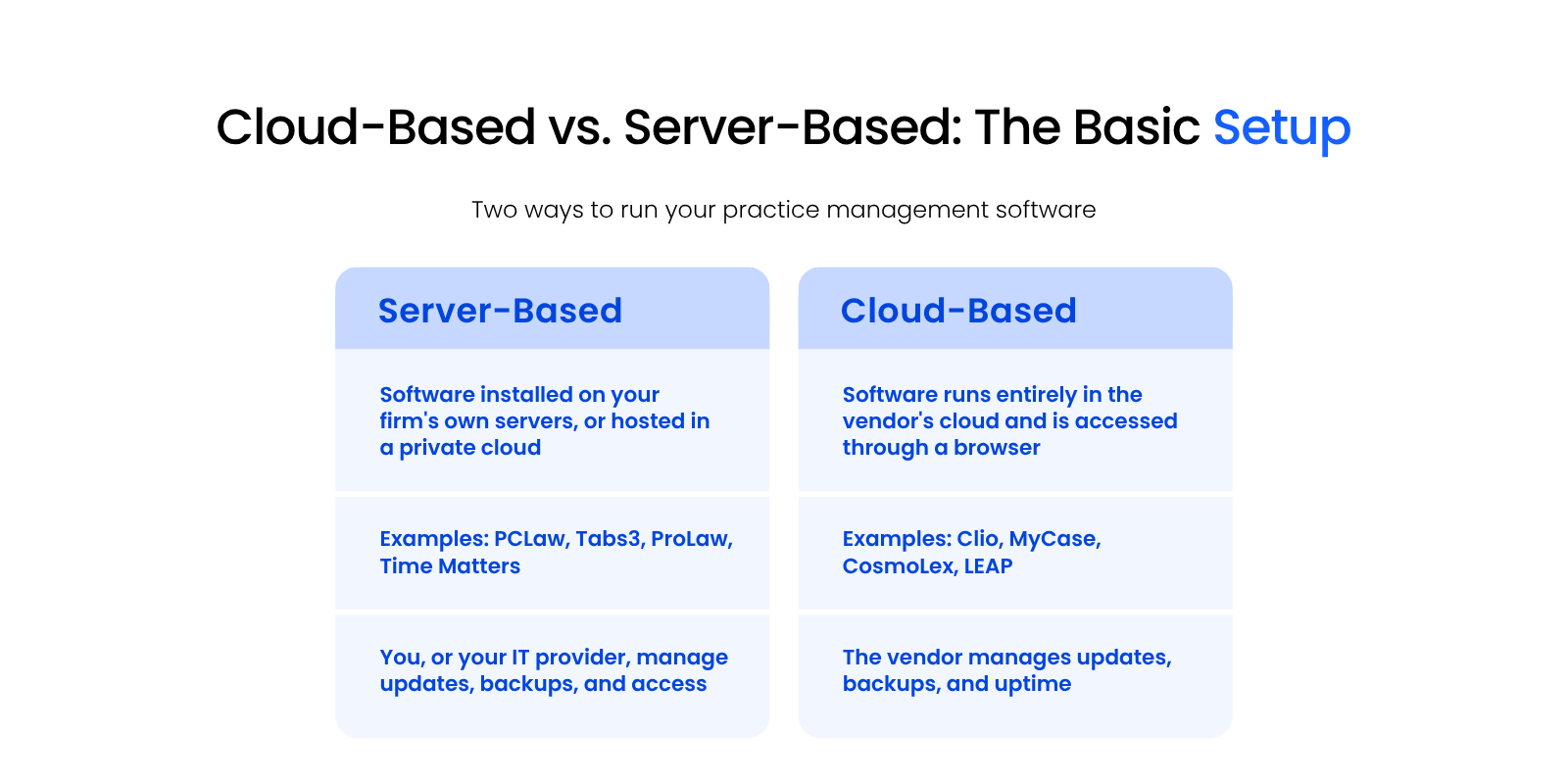
Two-column diagram comparing server-based and cloud-based law practice management software setups.

Every platform in this guide falls into one of these two deployment models, and the right one depends on how your firm wants to handle updates, security, and access, not just which features you need.

Why Firms Choose Cloud-Based Software

Cloud-based software gives firms mobility and automatic updates without the upfront cost of servers.

  • Your team can log in from anywhere with an internet connection — useful for firms with remote staff or multiple offices
  • The vendor handles updates, security patches, and uptime, so your firm doesn’t need in-house IT expertise just to keep the software running

On-prem servers are significantly more riskier and far more often compromised than cloud systems.

— Mike Dewdney, Director of Cloud & IT, Uptime Legal

That’s the opposite of what a lot of firms assume going in. Cloud infrastructure gets continuous security attention at a scale no single firm’s server room can match.

Why Firms Choose Server-Based Software

Server-based software gives firms more control and customization, which matters most for firms with complex or highly specific workflows.

  • Platforms like ProLaw and Time Matters have decades of legal-specific development behind them, showing up as configuration options cloud-native tools haven’t built yet
  • Firms that need tight control over their data, or workflows too specific for an off-the-shelf cloud tool, often find server-based software fits better

Can You Get Both? The Case for a Private Cloud

A private cloud lets your firm run server-based software like PCLaw or ProLaw while still getting cloud-level accessibility through a virtual desktop.

Migrating to cloud-based software isn’t the only way to get cloud benefits. Server-based software typically packs in more mature features than a firm will use, and giving that up just to gain accessibility is often the wrong trade. A private cloud, hosted through Uptime Cloud’s managed hosting for law firms, hosts your existing software, documents, and email in a secure cloud workspace instead.
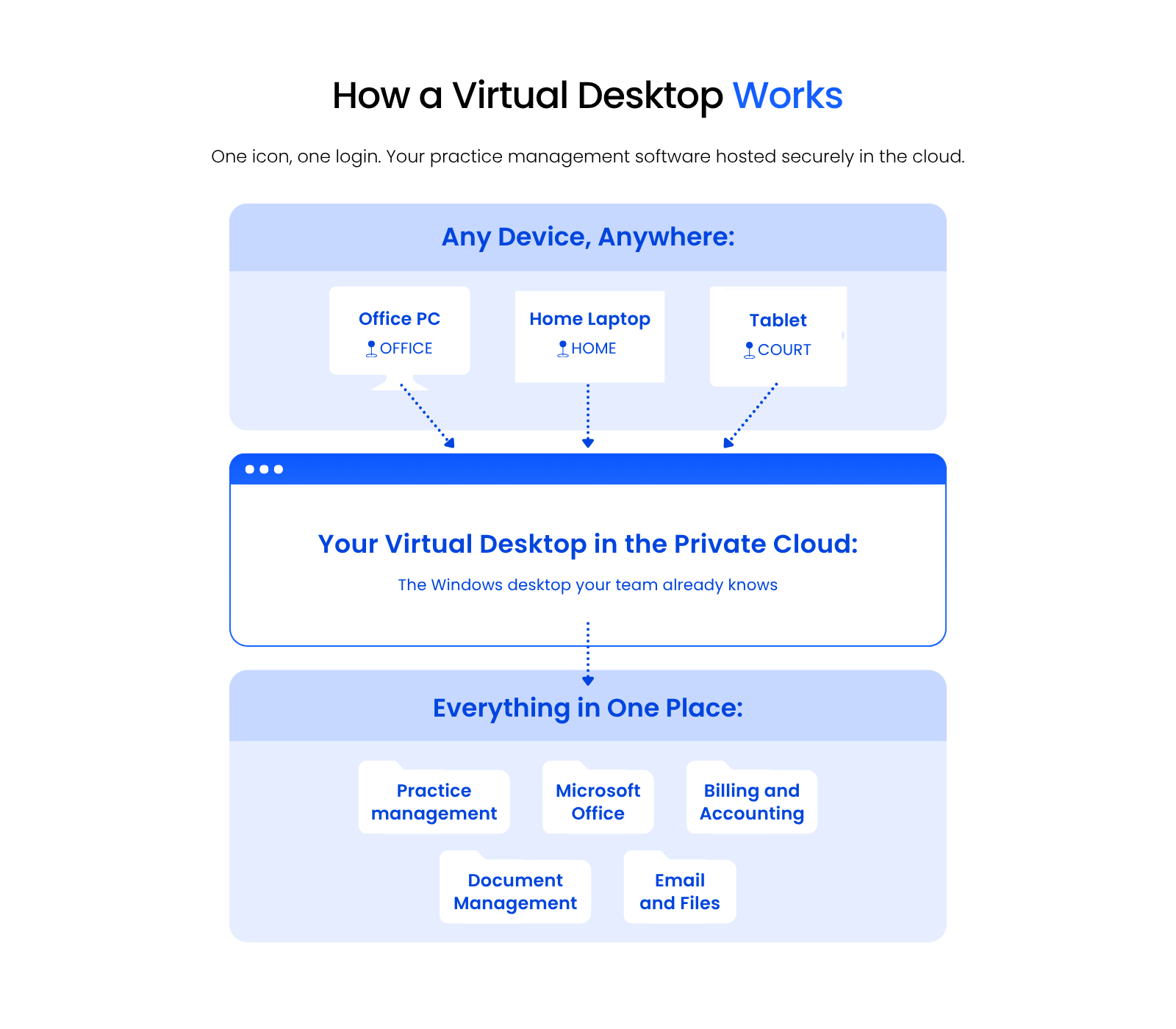
Diagram showing a virtual desktop as a single access point connecting a local device to cloud-hosted software.

A virtual desktop is the access point: one icon on your local desktop that opens directly into your cloud-hosted software, with no separate login process to manage.

  • Compare features, integrations, and cost against your firm’s actual workflow, not just the vendor’s marketing, before committing to a deployment method.

  • Make sure whichever platform you choose works with how your firm operates day to day, not just how it looks in a demo.

Your Practice Management Software Is a Two-Part Decision

Choosing law practice management software means deciding who runs your infrastructure, you or the vendor, as much as it means picking features.

The platforms in this guide handle case management, billing, and documents well in different ways. What separates a good fit from a bad one is matching that platform, and its deployment method, to how your firm actually works day to day.

Get both parts right, and the software disappears into the background of your firm’s work instead of fighting it.

WHAT’S NEXT

ARTICLE
Private Cloud for Law Firms

FREE ASSESSMENT
Get a Free IT Health Check for Your Firm

GET HELP
See How Uptime Legal Supports Law Firms Day to Day

Frequently Asked Questions

Law practice management software is a unified tool that helps your firm manage case work, document handling, billing, scheduling, and communication in one platform instead of separate tools.

It simplifies administrative tasks, cuts down on billing and scheduling errors, and frees up time for legal work instead of app-switching. That combination shows up directly in productivity and client satisfaction.

Yes. Reputable cloud-based platforms use encryption, multi-factor authentication, and regular security audits to protect your data and meet legal industry compliance expectations.

Most platforms integrate with email, calendar apps, accounting software, and document management tools. Check any platform’s integration list against what your firm already relies on before you commit.

It automates the billing process, tracks billable hours, generates invoices, and monitors payments, which cuts down on manual errors. Some platforms add online payment options so clients can pay directly from an invoice.

Yes. Most platforms on this list offer scalable pricing and features that fit solo practitioners, small firms, and larger multi-location firms alike.

To a degree. Many platforms include document versioning, collaboration, and templates, but if your firm handles high document volume, a dedicated system like LexWorkplace gives you stronger search and organization.

Start with your firm’s specific needs, budget, and preferred deployment method, then look for an intuitive interface, reliable support, and positive reviews from firms your size. A trial or demo makes the difference clear fast.

Clio and MyCase are the most widely adopted cloud-based platforms among small and midsize firms, while PCLaw, ProLaw, and Time Matters remain common at firms that want server-based or private-cloud deployment.

Neither is universally better. Cloud-based software wins on mobility and low maintenance, while server-based software wins on customization and control, and a private cloud can give your firm both.

Published On: September 28th, 2023 / Categories: Cloud Computing, Legal Practice Management, Legal Software Reviews, Legal Technology /
As the founder and CEO of Uptime Legal, I've had the privilege of guiding our company to become a leading provider of technology services for law firms.

Our growth, both organic and through strategic acquisitions, has enabled us to offer a diverse range of services, tailored to the evolving needs of the legal industry.

Being named an Ernst & Young Entrepreneur of the Year Finalist and seeing Uptime Legal recognized on the Inc. 5000 list of fastest-growing private companies in America are testaments to our team's dedication.

At Uptime Legal, we strive to continuously innovate and adapt in the rapidly evolving legal tech landscape, ensuring that law firms have access to the most advanced and reliable technology solutions.

Uptime Legal’s Technology Solutions

Cloud, software, IT, and document management built for today’s law firms.
  • Uptime Manage

Managed IT & Help Desk Solutions

  • Uptime Cloud

Cloud & Legal Application Hosting

  • Uptime Applications

Application Configuration & Support

  • LexWorkplace

Document Management For Law Firms