Clio Manage runs the back office for thousands of law firms, and it’s usually the first practice management tool firms look at when they outgrow spreadsheets and shared drives.

We’ve supported law firms running Clio Manage for years, and this review covers where it earns that reputation and where it falls short.

Clio Manage, once just called Clio, handles your firm’s clients, matters, billing, and calendars. Clio Grow, built on Clio’s 2018 acquisition of Lexicata, handles client intake and CRM; together they form Clio Complete.

If you’re comparing legal practice management software broadly, Clio is one of the most common places firms land, and it’s worth knowing exactly what you’re getting before you commit.

It’s really, really important that your MSP is either certified in that particular product, or if not certified, very experienced with a good working relationship with that software company.

— Dennis Dimka, Founder, LexWorkplace

  • Best for small-to-midsize firms that want an easy, fully web-based practice management platform with a short learning curve.

  • Deep integration network — Office 365, Google Workspace, QuickBooks, and 250+ more — is one of its strongest features.

  • Built-in document storage is basic. Firms with heavier document management needs will want a dedicated DMS alongside Clio.

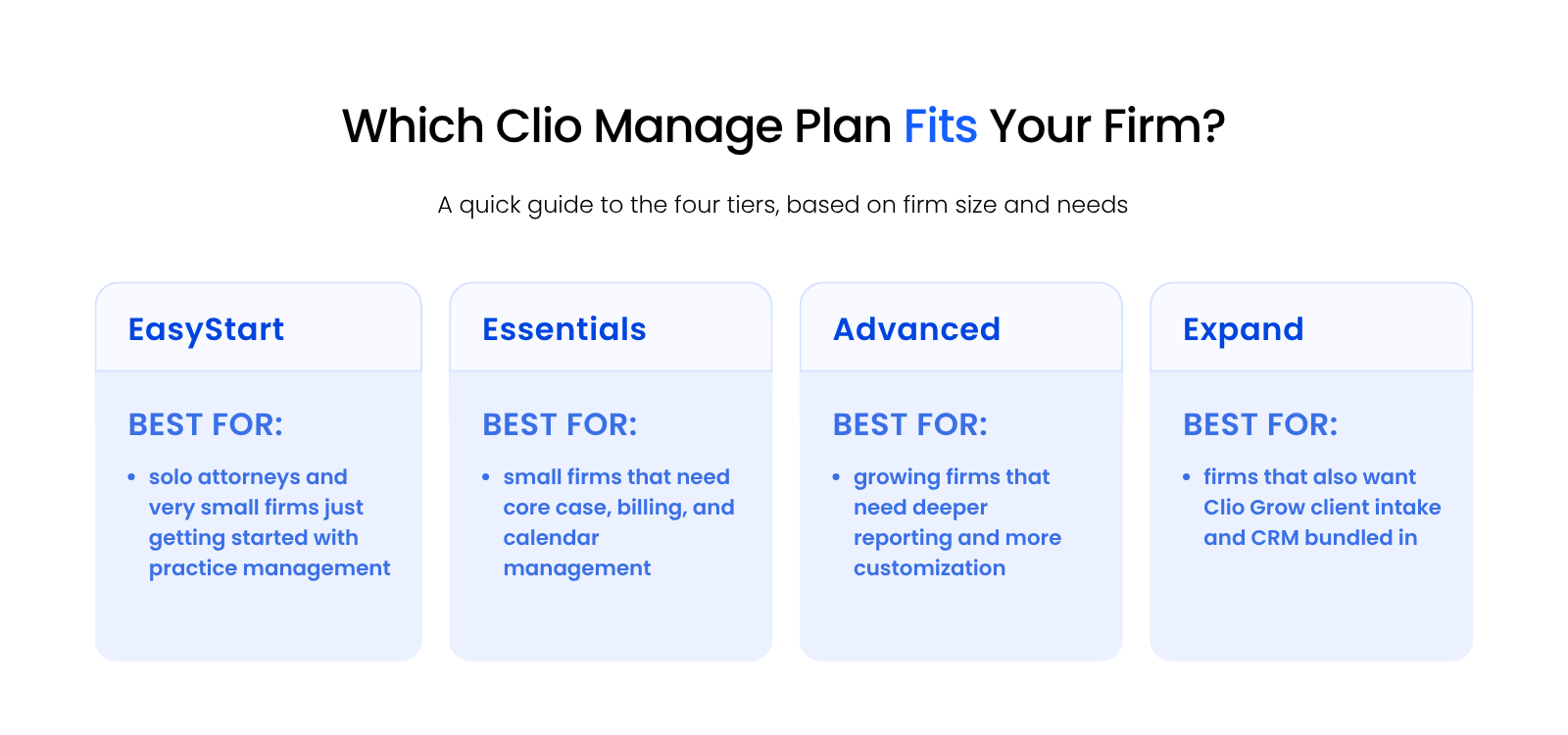
  • Four pricing tiers ($49–$149/user/month); the right one depends on firm size and whether you need Clio Grow for intake and CRM.

  • Uptime Legal is a Clio Certified Consultant and Clio’s Partner of the Year four years running. We help firms implement and support Clio Manage from day one.

Clio Manage Is a Good Fit for Firms That…

Clio Manage is a good fit for firms that need easy-to-use, flexible practice management for their law firms. In particular, Clio is often a great fit for small and midsize law firms that want an application that is natively web-based (no servers required) and works on Windows or Mac computers.

In addition, Clio Manage is a good fit for law firms that need integrations with other software, such as Office 365, Google Workspace, Airtable, Asana, and many other cloud-based tools.

Finally, Clio Manage is often a good fit for firms that need lightweight practice management, where user adoption will be easy and where the firm needs to get up and running quickly.

clio-logo

Clio Manage

Cloud-based practice management for law firms

Best for: Cloud-ready small to midsize law firms of 1–50 users wanting easy, web-based practice management with a deep integration network.

PRICING

From $49/user/mo

FREE TRIAL

Yes

CLOUD-NATIVE

Yes

MAC SUPPORT

Full

STRENGTHS

  • Fully web-based — no servers, no local installation, works on Mac and Windows out of the box
  • 250+ third-party integrations including Office 365, Google Workspace, and QuickBooks
  • Built-in billing, invoicing, and online payment processing via Clio Payments
  • Clio Grow available for client intake and CRM as part of the Clio Complete bundle
  • Implemented and supported by Uptime Legal, Clio’s Partner of the Year four years running

LIMITATIONS

  • Built-in document storage is basic — no OCR, full-text search, or document tagging
  • Billing time from Outlook emails requires two steps through the Communications page

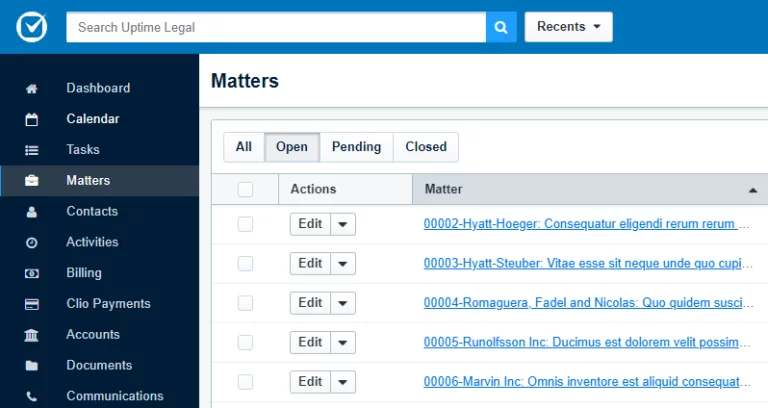
PRODUCT SCREENSHOT

Clio Manage interface

Clio Manage: Stand-Out Features

Clio Manage stands out because of how it’s built: it doesn’t try to do everything, but what it covers, it covers well. Here’s what firms consistently point to.

Simplicity & Ease-of-Use

Clio Manage has grown to become one of the most widely adopted cloud-based practice management platforms in North America, largely due to its ease of use. The interface is clean, modern, and designed so that staff can learn it quickly without a drawn-out training process.

That accessibility matters. A lot of legal software has deep functionality buried behind complex menus. Clio’s design keeps the most common workflows close to the surface.

Flexible Billing & Payments with Clio Payments

Clio includes built-in billing tools and, with Clio Payments, online payment processing. Firms can invoice clients and accept payment directly inside the platform, without a separate payment processor bolted on.

Time is tracked within Clio and flows directly into invoicing, reducing the manual steps between doing the work and getting paid.
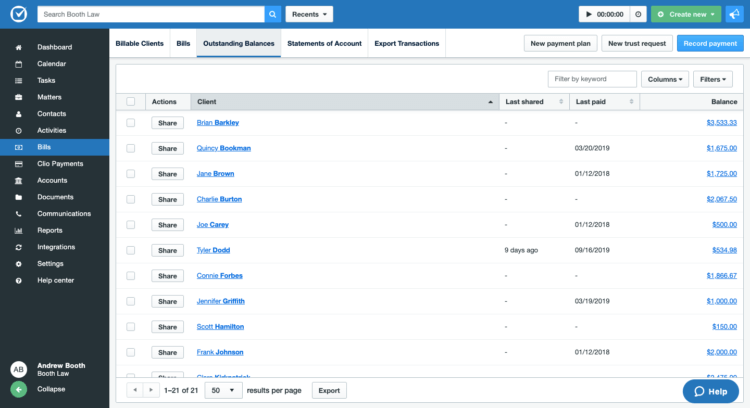
Clio Screenshot - Bills

Vast Network of Integrations

Clio Manage integrates with a wide range of tools: Office 365, Google Workspace, QuickBooks, Zapier, Slack, Zoom, and hundreds more. That breadth lets firms connect Clio to tools they’re already using rather than replacing everything at once.

For a firm running Microsoft 365 across the board, for example, Clio’s Outlook integration is central to how billing and communication get captured.

Sophisticated Case Management

Clio Manage gives firms flexibility in how they structure matters. Custom fields and categories let firms adapt the platform to specific practice areas rather than working around a generic setup.

Conflict checking, contact management, and document storage are all available within the matter view.
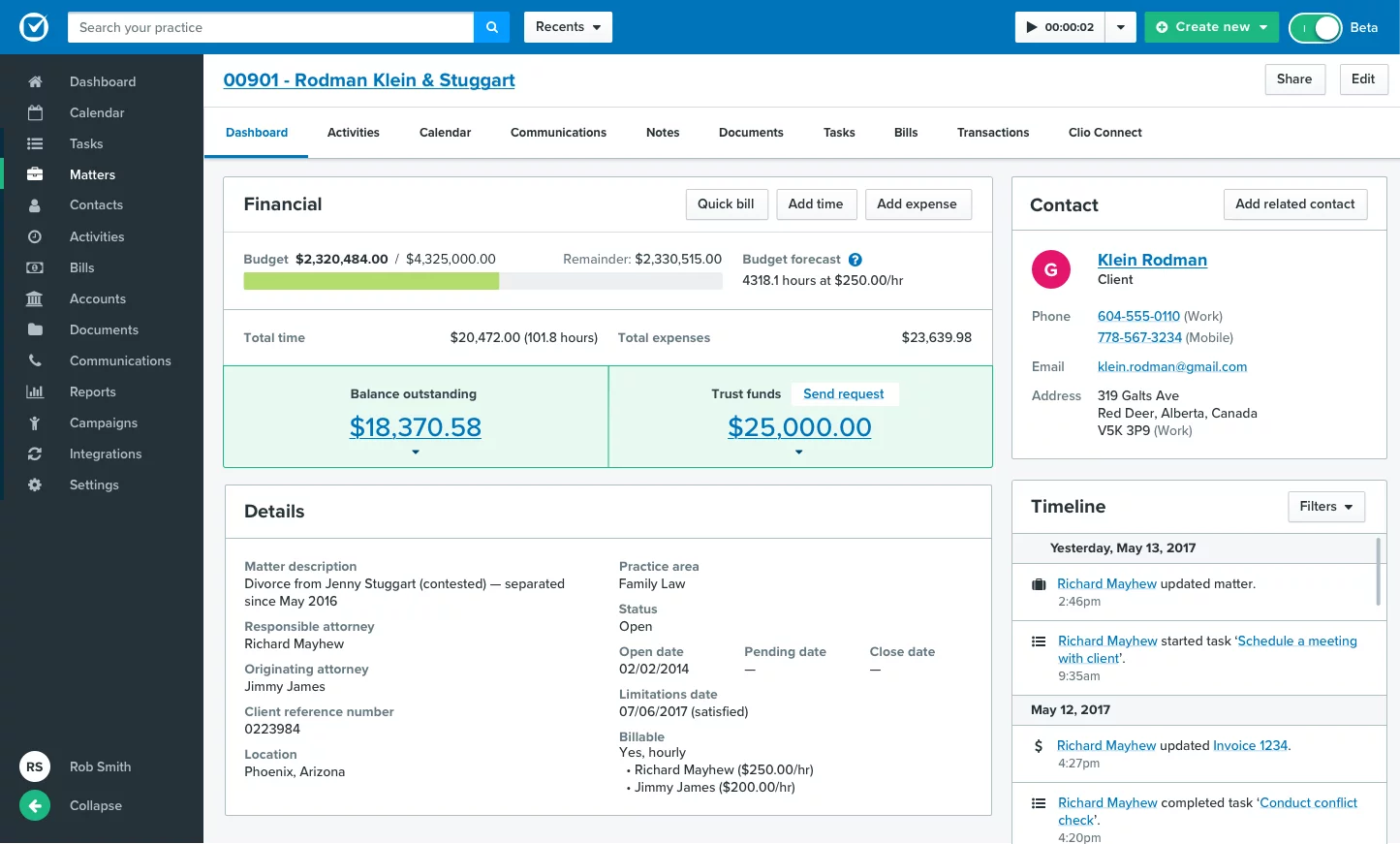
Clio Screenshot - Matters

Intake and CRM with Clio Grow

Clio Grow is a separate add-on that handles client intake, lead tracking, and CRM. Bundled with Clio Manage, it creates a full pipeline from first contact through active matter.

Firms that want both front-end intake and practice management under one roof can combine Clio Manage and Clio Grow into Clio Complete.

Dashboard: Mission Control for Your Law Firm

The Clio Manage dashboard surfaces the metrics that matter day to day: upcoming deadlines, captured hours, pending invoices, and recent activity. It gives attorneys and firm administrators a quick read on where things stand without digging through individual matters.
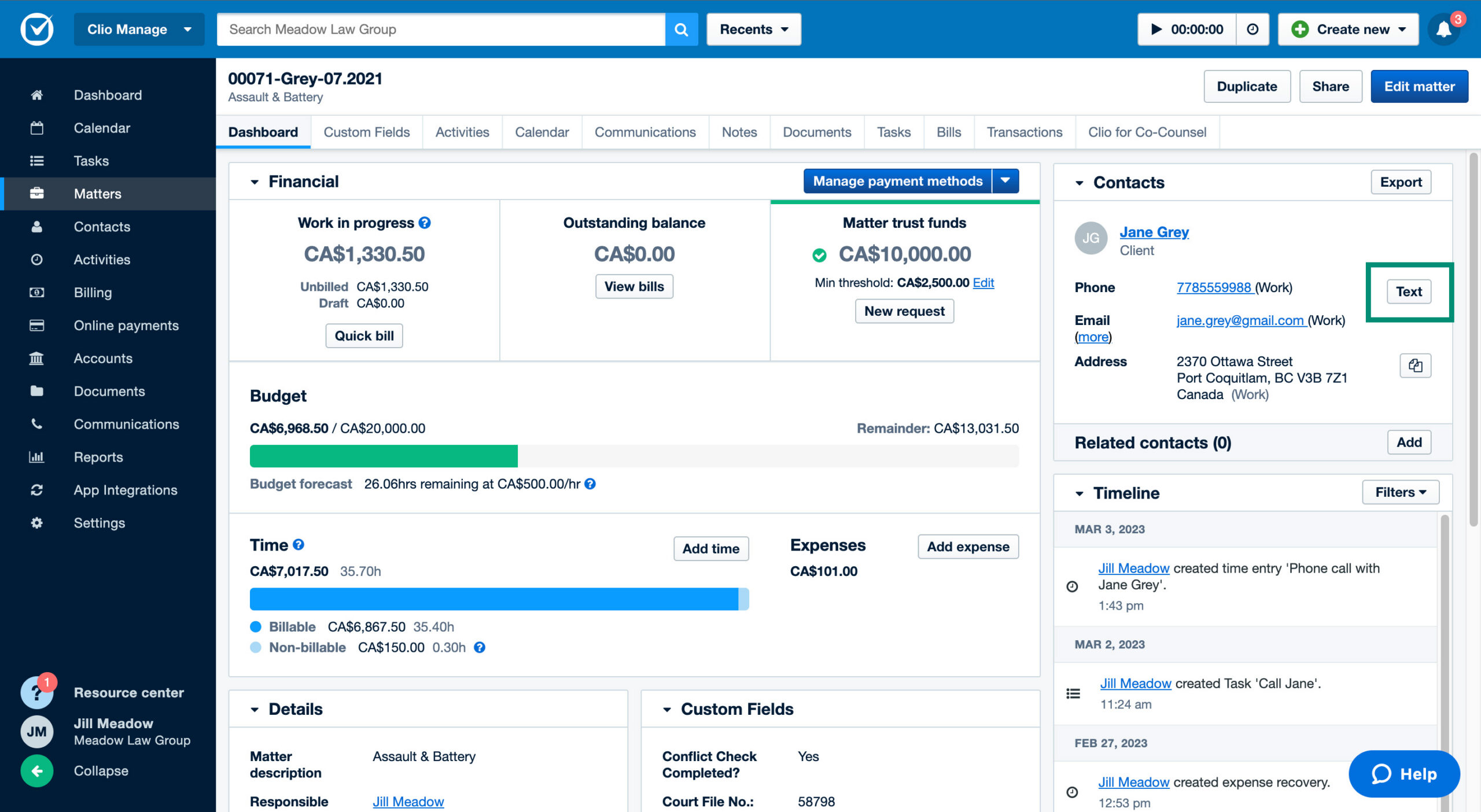
Clio Screenshot - Dashboard

Personal Injury Practice Area Module

Clio Manage offers a Personal Injury Add-On with tools built specifically for that practice area: medical records tracking, lien management, and a built-in settlement calculator. It’s available on select plans, so confirm your tier includes it before assuming it’s covered.

Split-screen graphic with text on the left reading “Uptime Legal: LEAP – Complete Review, Features, Pricing,” and a photo on the right showing three professionals seated at a long table in a modern, open-concept office, working on laptops beneath a mirrored ceiling with glowing digital text.

LEAP Review

See how LEAP compares to Clio Manage on features, pricing, and fit for small law firms.

Complete Feature List

Clio Manage covers the core functions a law firm’s practice management software needs. A few go only as deep as a growing firm requires, though, so it’s worth knowing what each one actually means in practice.

  • Matters: The center of everything in Clio. Every client, document, contact, and time entry lives inside a matter. Organization is matter-centric, which maps cleanly to how law firms work.

  • Contacts: A central database of clients, opposing counsel, courts, and other contacts, linked to matters.

  • Time Tracking: Track time from anywhere: desktop, mobile, or the Outlook integration. Multiple timers can run simultaneously.

  • Billing: Generate invoices from tracked time and expenses, apply payment plans, and send bills directly to clients.

  • Clio Payments: Built-in online payment processing. Clients can pay invoices with a credit card without a separate merchant account.

  • Trust Accounting: Separate trust ledgers, compliant with state bar trust accounting requirements. This is a meaningful differentiator from generic billing software like QuickBooks, which doesn’t natively understand trust rules.

  • Document Management: Clio Manage includes basic document storage at the matter level. It’s straightforward and functional, but it’s closer to organized file storage than full document management. There’s no OCR, no full-text search across all documents, and no tagging system. Firms with heavier document needs typically pair Clio with a dedicated DMS.

  • Task Management: Create, assign, and track tasks inside matters. Useful for managing workflows across staff.

  • Calendar: Court deadline tracking, appointment scheduling, and integration with Google Calendar and Outlook.

  • Communication Tracking: Log calls, emails, and notes to matters. The Clio for Gmail and Clio for Outlook add-ins let attorneys capture communication directly without switching apps.

  • Custom Fields: Build custom data fields for contacts and matters to capture practice-specific information.

  • Reporting: Standard reports covering billing, time, and origination. Not as deep as a standalone BI tool, but sufficient for most firm management needs.

  • Client Portal: A secure client-facing portal where firms can share documents and communicate with clients outside of email.

  • Integrations: Over 250 third-party integrations through the Clio App Directory, covering accounting, productivity, e-signature, and more.

  • Mobile App: Full iOS and Android app for capturing time, accessing matters, and communicating with clients on the go.

  • Clio Grow (add-on): Client intake, lead tracking, and CRM. Available as a standalone product or bundled with Clio Manage as Clio Complete.

FREE ASSESSMENT

Would your firm’s IT pass a client security review?

A 5-minute self-assessment that grades your firm across security, cloud, and backups — and shows you exactly where you’re exposed.

Pros and Cons of Clio Manage

Here’s what stands out after years of setting up and supporting Clio Manage at law firms.
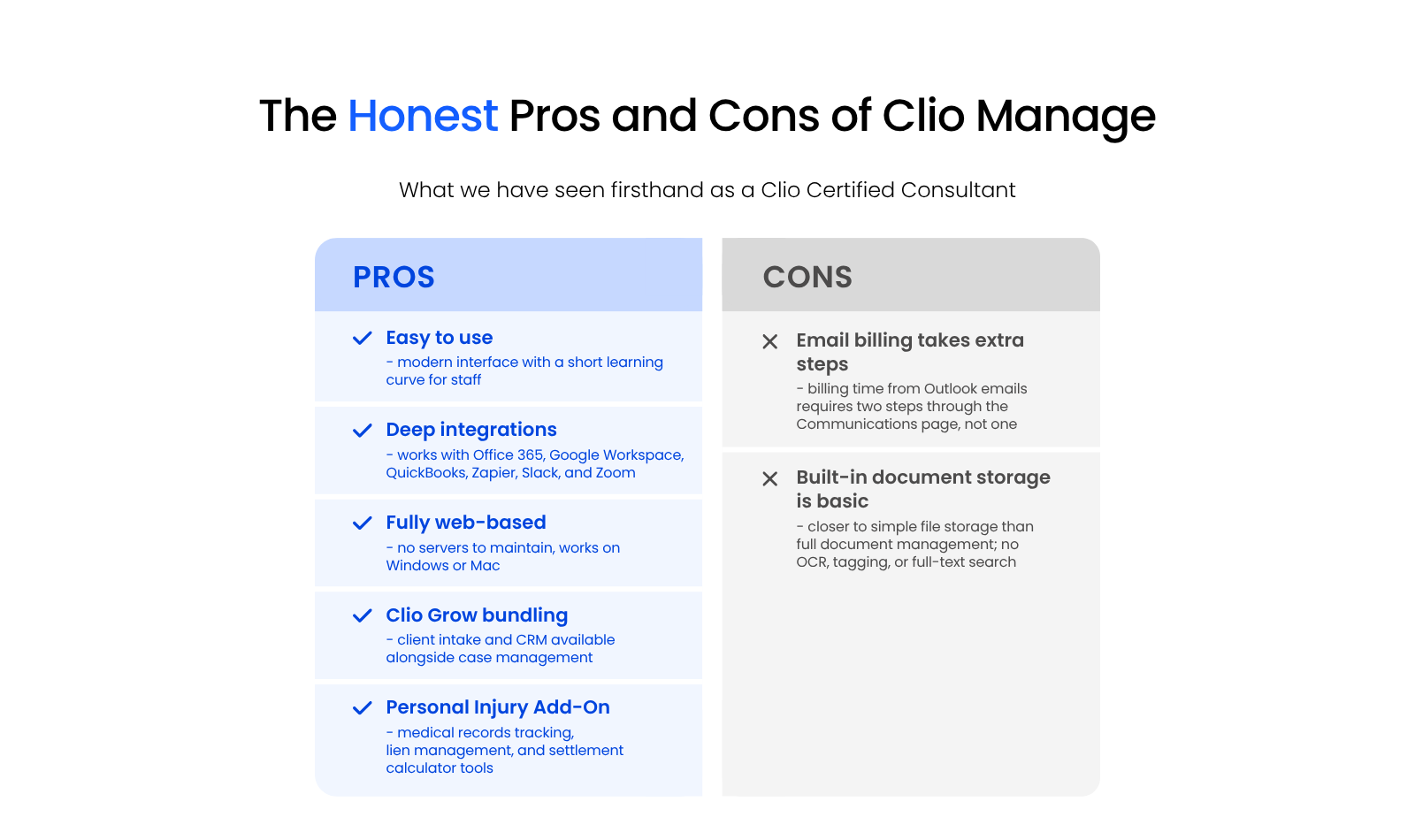
Two-column graphic showing the pros and cons of Clio Manage practice management software for law firms.

Pros

  • Easy to use: Modern interface with a short learning curve for staff. New users get up to speed quickly without extensive onboarding.

  • Deep integrations: Works with Office 365, Google Workspace, QuickBooks, Zapier, Slack, and Zoom, among hundreds of others.

  • Fully web-based: No servers to maintain. Works on Windows, Mac, and mobile without needing a local installation or VPN.

  • Clio Grow bundling: Client intake and CRM are available alongside case management under the Clio Complete bundle.

  • Personal Injury Add-On: Medical records tracking, lien management, and a settlement calculator, available on select Clio Manage plans.

Cons

  • Outlook email billing takes extra steps: Billing time directly from an Outlook email requires going through the Communications page rather than a single inline click. It’s a real friction point for firms that capture time heavily from email.

  • Built-in document storage is basic: Document storage in Clio is functional, but it doesn’t do what a dedicated DMS does. No OCR, no full-text document search, no tagging and profiling. Firms with significant document management needs will need to pair Clio with a separate tool.

User Feedback

As a Clio Certified Consultant, we hear directly from firms using Clio Manage day to day. Here’s some of what they’ve told us.

“Clio has been fantastic for our office. It’s very user friendly and there are so many integrations, it’s hard to not like it. They continue to improve the product.”

– Kellie (Clio user)

“Clio has been a game changer! I am a solo practitioner and Clio has simplified so many of my office tasks; it’s outstanding! I love that I can use it anywhere, whether from my phone or the office. I highly recommend Clio to other attorneys.”

– Jacy (Clio user)

“User friendly, effective and affordable! Clio is a well-designed, thoughtful practice management solution. After using other solutions for about 20 years, I’m finally happy with my practice management software!”

– Roel (Clio user)

“The ability to bill time and expenses through documents is amazing. The only downside is with Outlook. When an email comes in, you do have to go to the Communications page to bill the time for that email instead of being able to do it directly in Outlook, but it is a two-step process rather than one, so it is not terrible.”

– Jeffrey (Clio user)

A Clio Client Story

Clio is used by law firms across North America. As part of our review of Clio Manage, we share the story of how one law firm, Ashby Law, used Clio to streamline and grow their law practice.

Clio Software Pricing

Clio Manage is available at four pricing tiers, all billed per user per month. Prices shown are as of publication; verify current pricing at clio.com before deciding.

Clio Manage Pricing Tiers

Plan Price (per user/month, billed monthly)
EasyStart $49
Essentials $89
Advanced $119
Expand $149

A few things to know about these tiers:

EasyStart is designed for solo attorneys and very small firms getting started with practice management. It covers the fundamentals (time, billing, matter management, and client portal) without the full feature set of higher tiers.

Essentials adds features suited for small firms that need more depth in case management and law firm payment processing workflows.

Advanced is built for growing firms that need more sophisticated reporting and customization on top of the core platform.

Expand bundles Clio Grow (the intake and CRM product) with Clio Manage. Firms that want both front-end intake management and back-end case management in one subscription should look here.

Each tier step up adds functionality. The right tier depends on your firm’s size and whether you need Clio Grow’s intake and CRM tools as part of the package.

How Uptime Legal Supports Clio Users

We’re a Clio Certified Consultant, and for us that’s not a credential on a badge — it means our team actually works inside Clio Manage with law firms. Implementations, configuration, integrations with your existing stack, and ongoing support when something goes wrong.

Clio has recognized us as their Partner of the Year four years running — 2022, 2023, 2024, and 2025. That’s a working relationship most firms don’t get access to through a generic IT provider or a self-guided setup.

If your firm is evaluating Clio Manage and wants to get the setup right from day one, we can handle the full implementation and keep it running — including integrating Clio with Office 365, configuring your matter workflows, and supporting your team on an ongoing basis.

Case-Study-5

“Uptime Legal was a true miracle when the pandemic struck. We moved to Uptime Legal and were working immediately.”

Todd Tracy
The Tracy Law Group, PLLC

Who Clio Manage Actually Fits Best

Clio Manage works best for small and midsize firms that want an easy, web-based tool with a deep bench of integrations. Firms that need sophisticated document management built in will hit its limits fast.

Its ease of use and wide integration network cover most of what a growing firm needs day to day. Firms with heavier document management needs will want to pair Clio with a dedicated tool rather than rely on its built-in storage.

That tradeoff should drive your decision more than the feature list does.

WHAT’S NEXT

ARTICLE
7 Reasons Your Law Firm Should Consider Clio Manage

FREE ASSESSMENT
Get a Free IT Health Check for Your Firm

GET HELP
See How Uptime Legal Supports Law Firms Day to Day

Frequently Asked Questions

Clio Manage handles practice management: matters, billing, time tracking, and calendars. Clio Grow handles the front end of client relationships: intake forms, lead tracking, and CRM. They’re sold separately and can be bundled as Clio Complete.

Clio Manage runs from $49/user/month (EasyStart) to $149/user/month (Expand), billed monthly. Annual billing lowers each tier by roughly $10-20/user. Verify current pricing at clio.com before deciding.

Yes, but with a friction point: billing time from an Outlook email requires two steps through the Communications page rather than a single inline action. It works, just not as a one-click process like capturing time from within Clio itself.

Yes, especially on the EasyStart or Essentials tier. It’s web-based, easy to learn, and doesn’t require a server or dedicated IT setup. Solo and small firms are some of Clio Manage’s strongest fits.

The strongest pros are ease of use, a wide integration network, and being fully web-based. The main cons are basic built-in document storage (no OCR, full-text search, or tagging) and extra steps to bill time from Outlook emails.

Published On: November 1st, 2023 / Categories: Clio, Law Firm Software /
As the founder and CEO of Uptime Legal, I've had the privilege of guiding our company to become a leading provider of technology services for law firms.

Our growth, both organic and through strategic acquisitions, has enabled us to offer a diverse range of services, tailored to the evolving needs of the legal industry.

Being named an Ernst & Young Entrepreneur of the Year Finalist and seeing Uptime Legal recognized on the Inc. 5000 list of fastest-growing private companies in America are testaments to our team's dedication.

At Uptime Legal, we strive to continuously innovate and adapt in the rapidly evolving legal tech landscape, ensuring that law firms have access to the most advanced and reliable technology solutions.

Uptime Legal’s Technology Solutions

Cloud, software, IT, and document management built for today’s law firms.
  • Uptime Manage

Managed IT & Help Desk Solutions

  • Uptime Cloud

Cloud & Legal Application Hosting

  • Uptime Applications

Application Configuration & Support

  • LexWorkplace

Document Management For Law Firms