Table of Contents
Time Matters has been part of the legal practice management conversation for decades, and if you’re sizing it up for your firm, you want facts, not a sales pitch.
This time matters review breaks down what the software actually does and how it stacks up among the legal practice management software your firm is probably comparing it against.
You’ll get the standout features, the complete feature list, real user feedback, the pricing model, and a straight verdict on fit by the end.
Introduction to Law Practice Management Software
Law practice management (LPM) software centralizes the day-to-day operations that keep your firm running: client and contact management, matter and case management, time and expense tracking, billing, calendaring, and task management.
Many platforms extend further into conflict checking, document assembly and automation, trust and business accounting, document management, and email management. Which of these your firm actually needs, and how deeply, shape which LPM platform fits best.
Introduction to Time Matters
Time Matters is a practice and document management platform built for small and midsize firms. It handles case and matter management, time and billing, and document management with real depth, though it doesn’t include complete accounting functionality on its own.
The platform emphasizes flexibility: you can shape matter screens, workflows, and reports around how your firm actually works. Time Matters runs as server- or desktop-based software that your firm can run on-premise or host in a private cloud environment.
A Good Fit for Firms That…
Time Matters suits firms that fit a few specific profiles.
The Company
Time Matters was originally developed independently, then acquired by LexisNexis. In 2019, LexisNexis and LEAP Software formed a joint venture that continues to develop and support Time Matters today.
Time Matters: Pros and Cons at a Glance
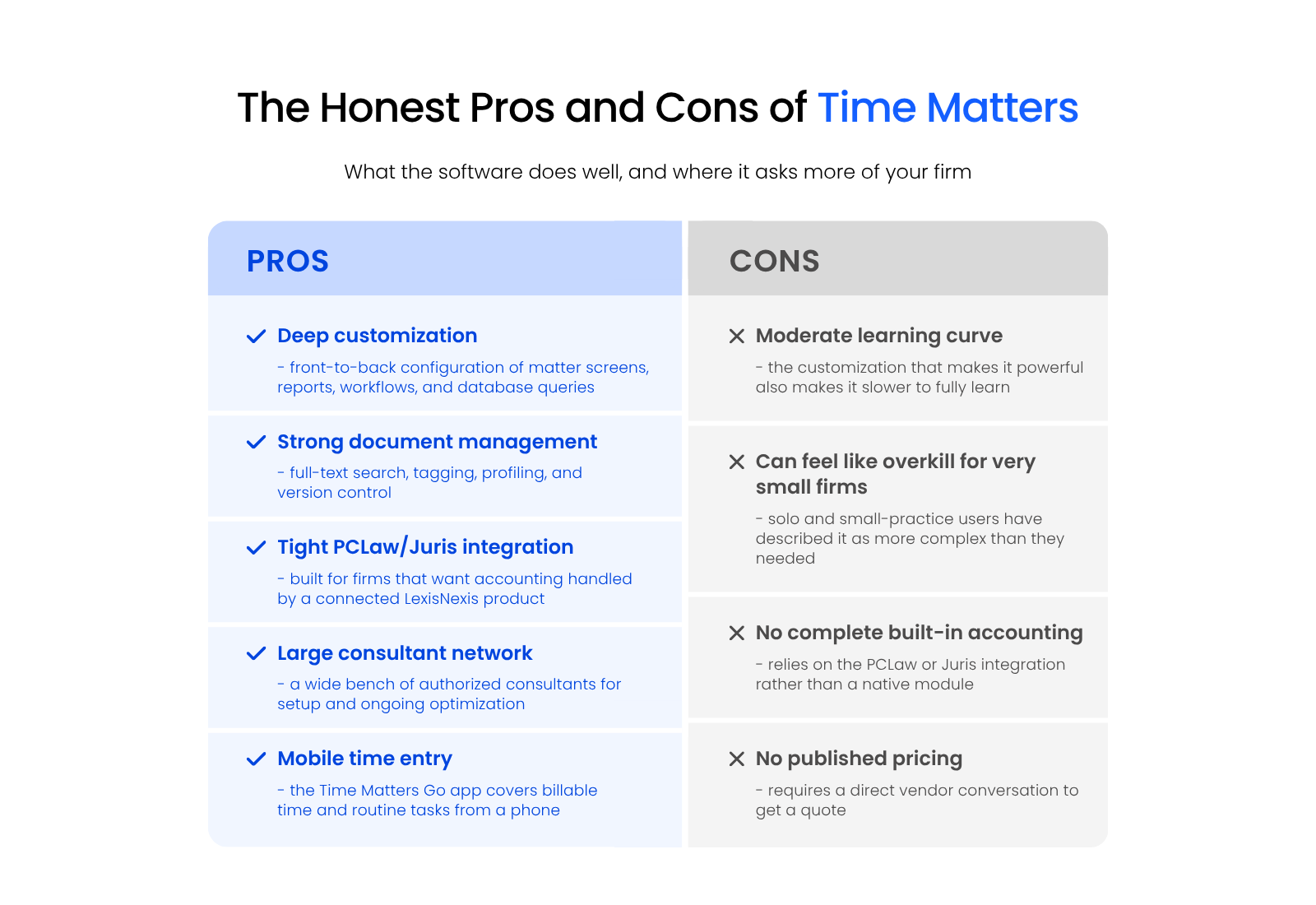
Here’s the honest version, pulled straight from the features and feedback covered in this review.
Pros
Cons
Time Matters Standout Features
A few capabilities set Time Matters apart from other practice management platforms.
Customization
Time Matters offers extensive customization, from front-end elements like matter screens and reports to back-end elements like database queries, workflows, and events. That range makes it one of the most customizable law practice management platforms available.
Integration with PCLaw and Juris
Time Matters includes basic billing capabilities, with integration options for PCLaw (built for small-firm accounting) and Juris (built for midsize and larger firms) within the LexisNexis ecosystem. If your firm already runs PCLaw, Time Matters slots in directly.
Network of Authorized Consultants
Time Matters maintains a large network of authorized, independent legal software consultants. If your firm needs help with setup, customization, or ongoing optimization, that network gives you a place to turn beyond the vendor itself.
Time Matters Go Mobile App
Time Matters Go lets you enter billable time and handle routine tasks from an iPhone or Android device, so time capture doesn’t have to wait until you’re back at your desk.
Time Matters Annual Maintenance Plan (AMP)
Time Matters is available as a monthly subscription license or as a perpetual license paired with an Annual Maintenance Plan (AMP). Either model gives your firm software technical and how-to support, Time Matters training and education, software updates and improvements, a dedicated account manager, and access to Time Matters cloud hosting options.
Complete Feature List
Time Matters covers the core functions your firm needs from a practice management platform.
Client & Contact Management
A central database stores information for clients, courts, related parties, and other contacts your firm works with.
Matter Management
A central database organizes matters, cases, and projects, with all the relevant case information in one place.
Calendaring
Individual calendars roll up into a firm-wide view, with Outlook synchronization keeping everyone aligned.
Task Management
Tasks and to-dos attach to specific matters or projects, with assignment and deadline tracking built in.
Time & Expense Tracking
Billable hours and expenses track directly against the clients and matters they belong to.
Billing
Invoicing covers billable hours, contingency work, and fixed-fee matters.
Conflict Checking
Database-wide searches for related names produce a documented conflict check your firm can rely on.
Document Management
Full-text search, tagging, profiling, and version management support advanced document handling.
Email Management
Outlook integration saves email directly to the matter it belongs to, instead of leaving it scattered across inboxes.
Mobile App
An Android or iPhone app covers time entry and a subset of Time Matters’ core functionality.
User Feedback
The comments below reflect feedback Time Matters users have shared directly.
“Long-Time User, Great Database”
Mark S., small law practice: “As a long time computer user with 10 gig of forms and a general rural practice that covers most areas of law for small firms, the merge into templates is foundational to our practice. The calendar, separate matter and contact database with many to many relationships makes it possible to relate and connect important things. Customization of field names, visual record forms is superb. The only downside is a moderate learning curve.”
“This Software Has Got You Covered”
Paralegal, small law practice: “If you really want an elaborate, automated system with detailed records to keep time, this program has got you covered. With Time Matters, we can just enter our time at the end of the day without any applications. The mobile app also made it easy to get time into the system when my computer was otherwise busy.”
“Too Complex for a Small Law Office”
Mark A., small law office: “Billing is strong, and the software is very sophisticated in its features. It is, however, overly complex. Way too much complexity for a small firm, especially a solo law practice.”
“Could Not Practice Law Without It”
Martin K., midsize law firm: “We have used this software since 2000, it’s extremely customizable, and we could not practice without it. This program is at the heart of our practice. We have a significant investment of time and resources in this program and to replace the customization and document creation would cost plus a significant amount of time and energy.”
Time Matters Software Pricing
Time Matters pricing follows two models based on how many timekeepers your firm has: a monthly subscription license, billed per user, or a perpetual license paired with an Annual Maintenance Plan. Current pricing requires a direct conversation with the vendor for a firm-specific quote.
Is Time Matters Right for Your Firm?
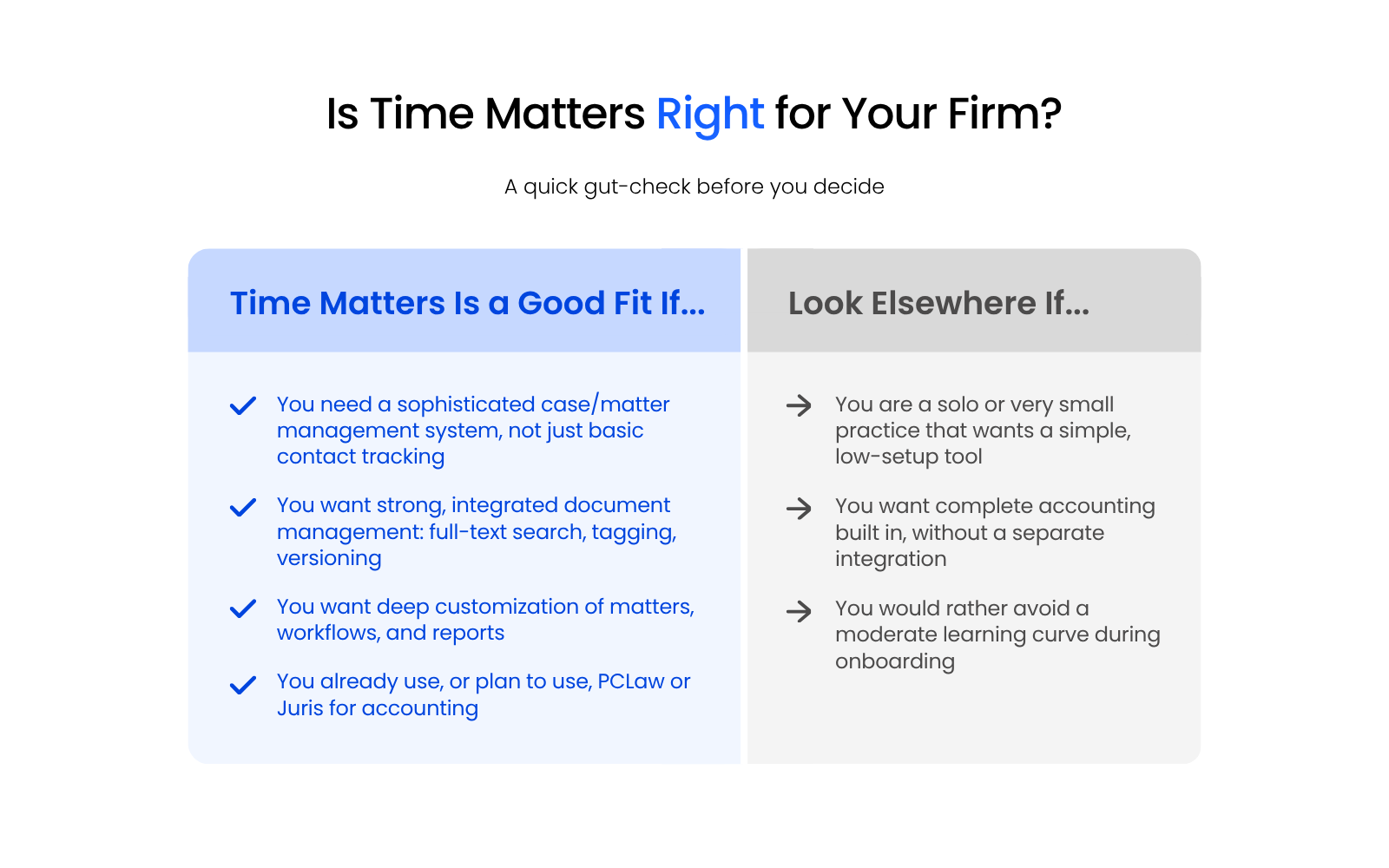
Time Matters rewards firms willing to invest in setup: deep customization, strong document management, and tight PCLaw or Juris integration make it a genuine workhorse for small and midsize practices with real case and matter complexity.
If you want a simple, out-of-the-box tool with built-in accounting and minimal ramp-up, look elsewhere. If you want a platform you can shape around exactly how your firm works, Time Matters earns a serious look.
If you’re still weighing Time Matters against other options, talk to an Uptime Legal Time Matters specialist before you commit.
Already Running Time Matters?
Already running Time Matters and looking to get it off your own servers? See how Uptime Legal hosts Time Matters in the cloud for secure, maintained access from anywhere, without the server headaches.

WHAT’S NEXT
Frequently Asked Questions

Uptime Legal’s Technology Solutions
Cloud, software, IT, and document management built for today’s law firms.